Prerequisites
- An active Noon Food partner account with access to your location(s) and reviews.
- Localyser Admin permissions.
🛠 Integration Steps
1. Add Your Account in 3rd Party Login
- Log in to your Localyser dashboard.
- Go to Settings > Other > 3rd Party Login.
- Click Add New and select Noon.
- Enter your Noon credentials.
- Set the Diff Start Date to one month prior (this ensures you capture past reviews).
- Select the applicable country from the dropdown.
2. Configure Your Locations
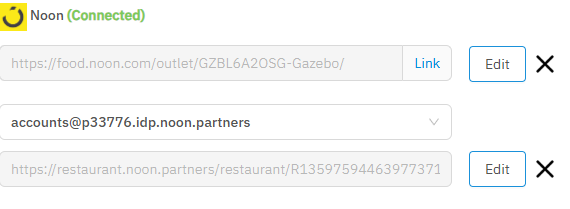
- Navigate to the Location's Platform Settings and locate the Noon section.
- Add your public Noon URL. (Example: https://food.noon.com/outlet/GZBL6A2OSG-Gazebo/
- Select the Noon account you just added from the dropdown menu.
- Add the location-specific URL. You can find this in the Noon Partner Portal by selecting an individual location on the Reviews page. (Example: https://restaurant.noon.partners/restaurant/R1359759446397737105389717A/ratings-and-reviews/?project=PRJ33776&R1359759446397737105389717A=GZBL6A2OSG
✅ Pro Tips
- Ensure you are copying the exact location-specific URL from the Noon Partner Portal to guarantee your reviews map accurately to the correct location in Localyser.
- Don't forget the Diff Start Date setting—pushing it back a month is the best way to backfill your recent review history right from day one!